
Resource: Saving Files in Programs Other Than Microsoft Office
There are many different types of applications used for word processing, presentations and spreadsheets. You may be familiar with applications such as Word Pad, Note Pad, Text Edit, etc. Students are free to use the application of their choice however the following formatting MUST be followed when saving files:
- For Word documents:
Instead of hitting "Save" select "Save As" then "Save As Type" from the bottom of the dialogue window (see image below) (Mac computers running iWork, select "Export")
Then select the option with a .doc extension
If no .doc option is available, please select .rtf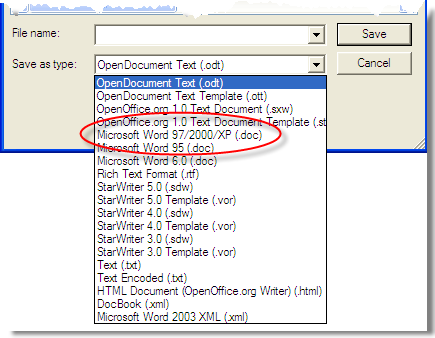
- For Presentations other than Powerpoint:
Instead of hitting "Save" select "Save As" then "Save As Type" (Mac computers running iWork, select "Export")
Then select the option with a .ppt extension
- For Spreadsheets other than Excel:
Instead of hitting "Save" select "Save As" then "Save As Type" (Mac computers running iWork, select "Export")
Then select the option with a .xls extension
Your file will now be saved into a more universal language accepted by all computers. You are welcome to keep files on your computer hosted in the original extension, but when submitting file to your teacher or uploading to your course you MUST follow these formats.